
Correct Ironing Temperature and Time Settings for Different Fabrics in DTF Printing
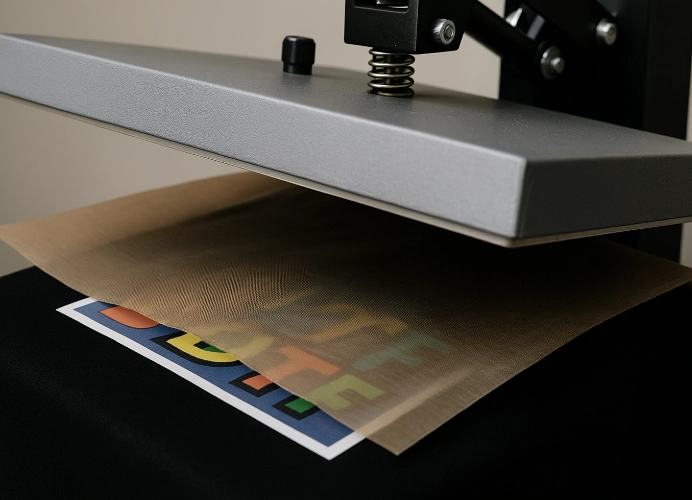
DTF or Direct to Film technology is a screen printing system that has revolutionized the clothing industry. Whether it’s a small shop producing limited quantities or a factory producing in large volumes, DTF enables precise and clear transfer of designs onto fabric, which is also durable and resistant to washing. However, the success of the work does not solely depend on the printer or ink; often overlooked but directly affecting quality are “temperature and pressing time.”

Correct settings ensure that the printed design adheres firmly, is smooth, does not crack, and retains its vibrant colors for a long time. Conversely, if the settings are inappropriate, whether too hot, too cold, or pressing for too long, it may cause the design to peel off, burn the fabric, or distort its shape. This article will explain the principles, concepts, and guidelines for setting appropriate parameters for different types of fabric in detail and systematically.
1. The Importance of Setting Temperature and Pressing Time
In the DTF printing process, the design printed on the film is covered with adhesive powder. When pressed onto the fabric, heat melts the adhesive, bonding the film layer to the fabric fibers permanently. Therefore, the temperature and time used must be just right.
If pressed at too low a temperature or for too short a time, the adhesive will not melt evenly, causing the design to adhere poorly and easily peel off. Conversely, if pressed at too high a temperature or for too long, the fabric may burn, the design may crack, or the ink may deteriorate. Thus, accurately controlling both these variables is crucial for production quality.
In addition to temperature and time, “pressure” also plays a role. If the pressure is insufficient, heat will not distribute evenly, causing some parts to adhere while others do not. Conversely, if the pressure is too high, the fabric may deform or develop creases.
2. General Guidelines for Setting DTF Pressing Equipment
Before delving into the specifics of different fabrics, it is important to understand the general process of DTF pressing.
Warm up the press to the desired temperature. Allow the pressing plate to heat up fully for at least 5 minutes before actual use to ensure even heat distribution across the plate.
Pre-press or pre-ironing the fabric for about 5-10 seconds before actual pressing helps remove moisture and creases, ensuring the film adheres firmly and evenly.
Place the film correctly with the printed side facing the fabric. DTF film has a printed side and a coated side; the printed side must touch the fabric directly.
Set the pressure appropriately. Use slightly more pressure for thicker fabrics, but reduce it for thinner or stretchy fabrics.
After pressing, remove the film according to the material type. Some films can be removed immediately (Hot Peel), while others need to cool down first (Cold Peel). Removing the film at the wrong time may cause the design to wrinkle or peel off.
Post-press or light re-ironing after removing the film helps smooth the surface, deepen the color, and increase wash durability.
3. Setting Up for Different Fabric Types
100% Cotton
Cotton is the most popular material for printing due to its excellent heat absorption and high pressure tolerance. Heat pressing on cotton can be done at higher temperatures than other fabrics, typically around 160–175°C, with a pressing time of about 10–15 seconds and medium to fairly heavy pressure.
Before pressing, a short pre-press is recommended to remove moisture from the fibers. After pressing and peeling off the film, a second press for 5–10 seconds can be done to ensure the design is set and smooth. It’s important to monitor for any signs of dullness or shine on the fabric, which may indicate that the temperature is too high and should be reduced slightly.
Polyester and Synthetic Fabrics
Polyester is highly sensitive to heat, so temperature settings must be carefully controlled. Start with a temperature of around 140–150°C and a pressing time of 10–15 seconds with medium pressure. If the temperature is too high, the fabric will shrink or develop a sheen immediately.
When pressing polyester, use a Teflon or silicone sheet on top to distribute heat evenly and prevent the fabric from developing a shine. Wait for the fabric to cool before peeling off the film, as pressing while the fabric is still hot can cause the design to shift or wrinkle.
Cotton/Poly Blend
Blended fabrics of cotton and polyester have moderate heat resistance and are suitable for temperatures around 145°C with a pressing time of 12–15 seconds and medium pressure. If the fabric has a higher polyester content, reduce the temperature slightly and avoid pressing for too long.
It is crucial to test blends before production, as different brands have varying fiber ratios. Some blends absorb heat like cotton, while others react like polyester. Keeping a record of the best settings will help maintain consistent quality.
Spandex, Stretch, or Nylon
These fabrics are highly elastic but very sensitive to heat. If the temperature is too high, the fabric can deform or wrinkle. Suitable temperatures are around 130–140°C with a pressing time of 8–10 seconds and light to medium pressure. Be careful not to press too hard, as the fabric may stretch permanently.
When peeling off the film from stretch fabrics, wait until the fabric is cool to ensure the adhesive sets properly. A light re-press for a few seconds after peeling can smooth the surface, but do not press for more than 5 seconds. A tip is to use a cotton sheet while pressing to help distribute heat and reduce the risk of fabric scorching.
Canvas, Linen, or Thick Materials
These materials are heat resistant and can be pressed at temperatures similar to or slightly higher than cotton, around 165–170°C, with a pressing time of 12–15 seconds and fairly heavy pressure. This is necessary to ensure heat penetrates through the fabric layers.
Due to the rough surface, ensure the film adheres well to the fabric. For tote bags or fabric bags, use a rubber or foam pad to help distribute pressure evenly. A post-press for 5–10 seconds after pressing can enhance adhesion and reduce air bubbles in the design.
Nylon Fleece or Heat-Sensitive Materials
Nylon fleece and inexpensive polypropylene bags tend to melt easily at high temperatures. Use a very low temperature, around 125–135°C, with a pressing time of 10–12 seconds and light pressure. If a second press is necessary, do it briefly and use a Teflon sheet to protect the fabric from direct heat.
4. Post-Press Inspection Techniques
After pressing and peeling the film, the following critical areas should be checked:
Edge adhesion – Use your finger to rub the edges. If there is no lifting or wrinkling, it indicates that the heat and pressure were sufficient.
Surface of the print – It should be smooth and not wavy or bubbly. Bubbles indicate that the temperature was too low or the pressure was uneven.
Color and gloss – If the color is dull or faded, it may be due to excessive heat; reduce the temperature. If the color is too matte and easily peels off, increase the pressing time.
Feel of the fabric – It should not be overly stiff. If it feels too stiff, it means the adhesive has melted too much; reduce the pressing time in the next round.
5. Tips for DTF Shop Operators
Maintaining consistent temperature and pressing time in a shop that produces large quantities can be challenging, but it can be achieved by establishing a recording and testing system.
Test every time you change fabric or film; do not assume that settings that work for one fabric will work for another.
Keep records of the best settings, noting temperature, time, pressure, and results to use as a standard for production.
Regularly check the pressing machine using an infrared thermometer, as the machine may sometimes display inaccurate readings.
Train press operators to understand fabric characteristics; it’s not just about memorizing numbers but recognizing signs of fabric that is too hot or too cold.
Keep fabric samples and record images in a sample file for reference. This helps reduce errors when dealing with new customers or re-producing items.
6. Common Issues and Solutions
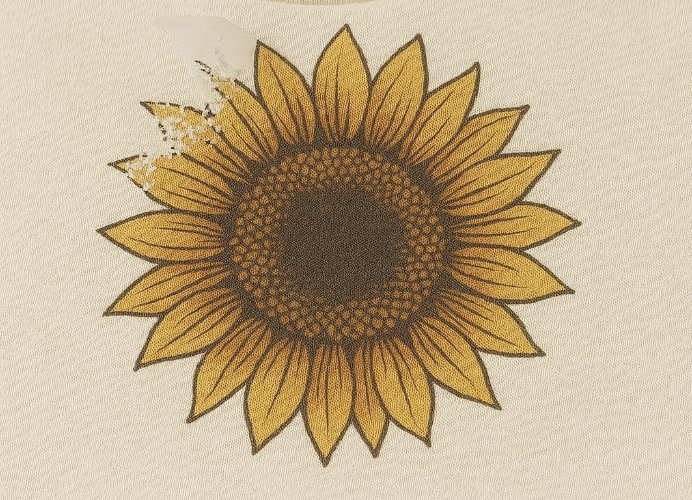
Prints peel easily after a few washes – This is due to insufficient pressing temperature or time; increase the temperature by about 5 degrees or add 2-3 seconds to the pressing time.
Fabric shows scorch marks or discoloration – This usually happens when the temperature is too high or the pressure is too strong; reduce the heat and use a Teflon sheet to prevent scorching.
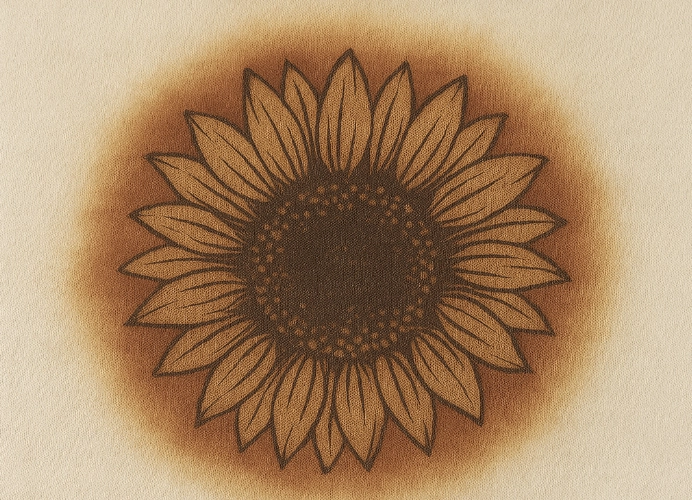
Prints crack or become stiff – This is due to over-pressing or excessive adhesive melting; reduce the pressing time and use a short post-pressing process instead.
Colors appear dull or faded – This may be due to pressing before the machine has reached full temperature or uneven pressure; allow the machine to reach the correct temperature before use.
Fabric distorts after pressing – The main cause is excessive pressure; reduce the pressure and use shorter pressing times, and place a cotton sheet on top.
7. Establishing Standards in a DTF Screen Printing Shop
For shops with multiple staff, ensuring everyone can set the machine to the same standards is crucial. Create a “Standard Pressing Manual” that specifies tested settings for each fabric type, attach sample images of good work, and note points of error for self-inspection by staff.
Additionally, implement a post-production quality control system, such as wash tests, rubbing tests, or repeated folding tests, to check if the print peels or cracks. This information will help continually adjust pressing settings for better results.
8. Additional Development Strategies
Once the principles of DTF heat pressing are understood, there are several ways a shop can further enhance its quality to surpass competitors, such as:
Investing in a heat press that evenly distributes heat, as even with the same settings, inconsistent heat will yield different results.
Choosing high-quality adhesive powder and film, as better materials require more precise temperatures but provide better adhesion and sharper colors.
Practicing the timing of film removal, especially for Cold Peel films that require waiting until they are completely cool.
Recording production data for each cycle to track which fabric types work best at what temperature settings.
Continuously doing these things will help your shop establish a reliable production standard and maintain consistent quality over the long term.
In summary,
DTF printing is not just about printing designs onto film and then heat pressing them onto fabric; it is a process that requires a detailed understanding of materials, heat, and time. Setting the correct heat and pressing times is what distinguishes amateur work from professional work.
Ready to Print Custom DTF with Screen168 Bangkok?
Single pieces to bulk wholesale. Free artwork file check and instant online pricing 24/7.
🚀 View Sizes, Prices & Order Online→