
DTF Printer Head Testing Techniques Before Purchase
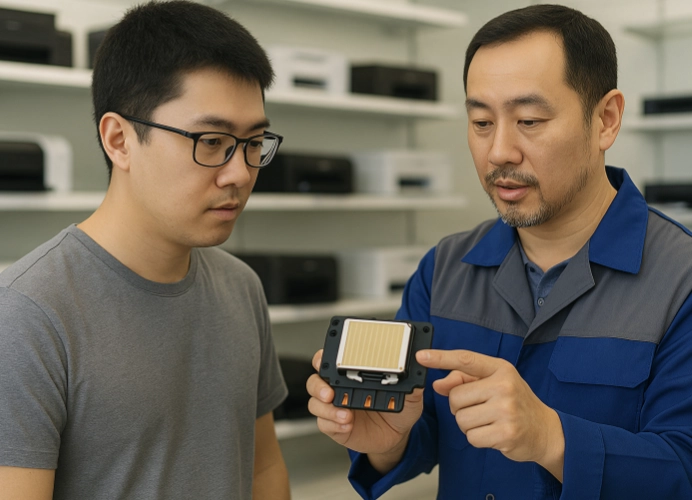
Why Testing DTF Print Heads Is Important
In an era where t-shirt and textile printing is rapidly growing, DTF (Direct-to-Film Printing) technology has become a cornerstone of the industry. With its ability to print designs onto film and then transfer them to various fabrics, the true heart of this system lies in the print head, which determines the quality, sharpness, vibrancy, and production speed of the prints.
Buying a new print head or replacing an existing one is a significant investment, with some models costing tens of thousands of THB. If you purchase the wrong one or fall prey to an incomplete print head, your business could lose both money and time. Therefore, “testing the print head before purchasing” is a crucial step that should not be overlooked.

Investing in a DTF (Direct to Film) printer is a critical decision for any printing business, whether you are a beginner or an experienced professional. Understanding and using the testing techniques outlined below will help you make a more informed and confident decision, ensuring that your investment in a DTF printer is worthwhile and capable of producing high-quality work consistently.
Understanding and Using Testing Techniques
1. External Inspection
Before diving into the technical aspects, it’s essential to conduct an external inspection of the print head. This includes checking for any visible signs of wear and tear, such as scratches or damage. A well-maintained print head should appear clean and undamaged.
2. Basic Print Test (Nozzle Check)
A nozzle check is the simplest and quickest way to test the print head’s integrity. This involves printing a test pattern from the printer. A good seller should be willing to let you perform this test without any issues. During the test, pay attention to:
- Line Continuity: The printed lines should be continuous and complete, with no missing or broken lines. Even a small gap can indicate a clogged nozzle.
- Color Consistency: The printed colors should be consistent, without any fading or color distortion.
- Straight Lines: Ensure that straight lines are printed for all colors, with no breaks.
If there are numerous missing lines, it could indicate a clogged or deteriorated print head.
3. Detailed Print Test
In addition to the nozzle check, testing with high-detail images or patterns will provide a clearer picture of the print head’s performance. Use files with multiple shades and complex details, then observe:
- Detail Sharpness: The printed image should be sharp, with vibrant colors and smoothness, without blurring or loss of detail.
- Color Gradation: The color gradation should be smooth, without visible steps or spots.
- Color Consistency in Large Areas: In large areas of the same color, the printed color should be consistent, without blotches or bands.
- Ghosting: Check for shadows or repeated images, which may indicate inaccurate movement of the print head or other mechanical issues.
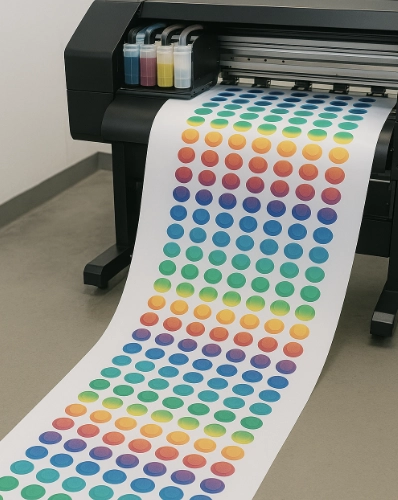
Perform continuous printing tests, printing a long strip of 1-2 meters to check stability. Observe if there are any mid-line breaks.
4. Inquire About History and Warranty from the Seller
Once you are satisfied with the print tests, don’t forget to ask the seller for additional important information:
- History of the Print Head: If it’s a second-hand item, inquire about the usage history of the print head. Is it a newly replaced head or has it been in use for a long time? The resolution should be close to what Epson specifies, such as 600dpi / 1200dpi, and the print speed should not fall below the standard.
- Warranty: Does the seller offer a warranty for the print head, and what types of damage does it cover? Ensure there is a written agreement or document for long-term peace of mind.
- Maintenance: Ask about proper maintenance methods to extend the lifespan of the print head, and whether there are after-sales services or consultation available.
Common Issues During Testing
- Missing or Overlapping Lines: Often caused by a deteriorated print head.
- Color Mismatch: May result from ink not being compatible with the print head.
- Ink Flow Issues: Could be due to problems with the ink delivery system or a clogged print head.
- Clogging: Can occur in both new and used print heads that have been stored for a long time.
Tips for Reading Test Results
- Good Print Head: Nozzle check should be 100% complete or at least 95%.
- Old Print Head: Often has recurring missing lines in the same position.
- Gradient Printing: Should have smooth transitions, not steps.
Tips for Selecting Suppliers
- Request Warranty and Sales Invoice: Check customer reviews and choose a store with after-sales services.
Investing time and being meticulous in testing the print head today will help you save costs and protect your business in the long run. This article summarizes the complete steps, from external inspection to nozzle check, actual work testing, problem analysis, and selecting reliable suppliers.
By understanding and using these testing techniques, you can make a more informed and confident decision, ensuring that your investment in a DTF printer is worthwhile and capable of producing high-quality work consistently. If you have any further questions, don’t hesitate to ask the seller for clarity before making a purchase. Investing in a DTF print head should not rely solely on advertisements but should involve actual testing before every purchase.
Ready to Print Custom DTF with Screen168 Bangkok?
Single pieces to bulk wholesale. Free artwork file check and instant online pricing 24/7.
🚀 View Sizes, Prices & Order Online→